
cmux
The terminal built for multitasking, organization, and programmability.
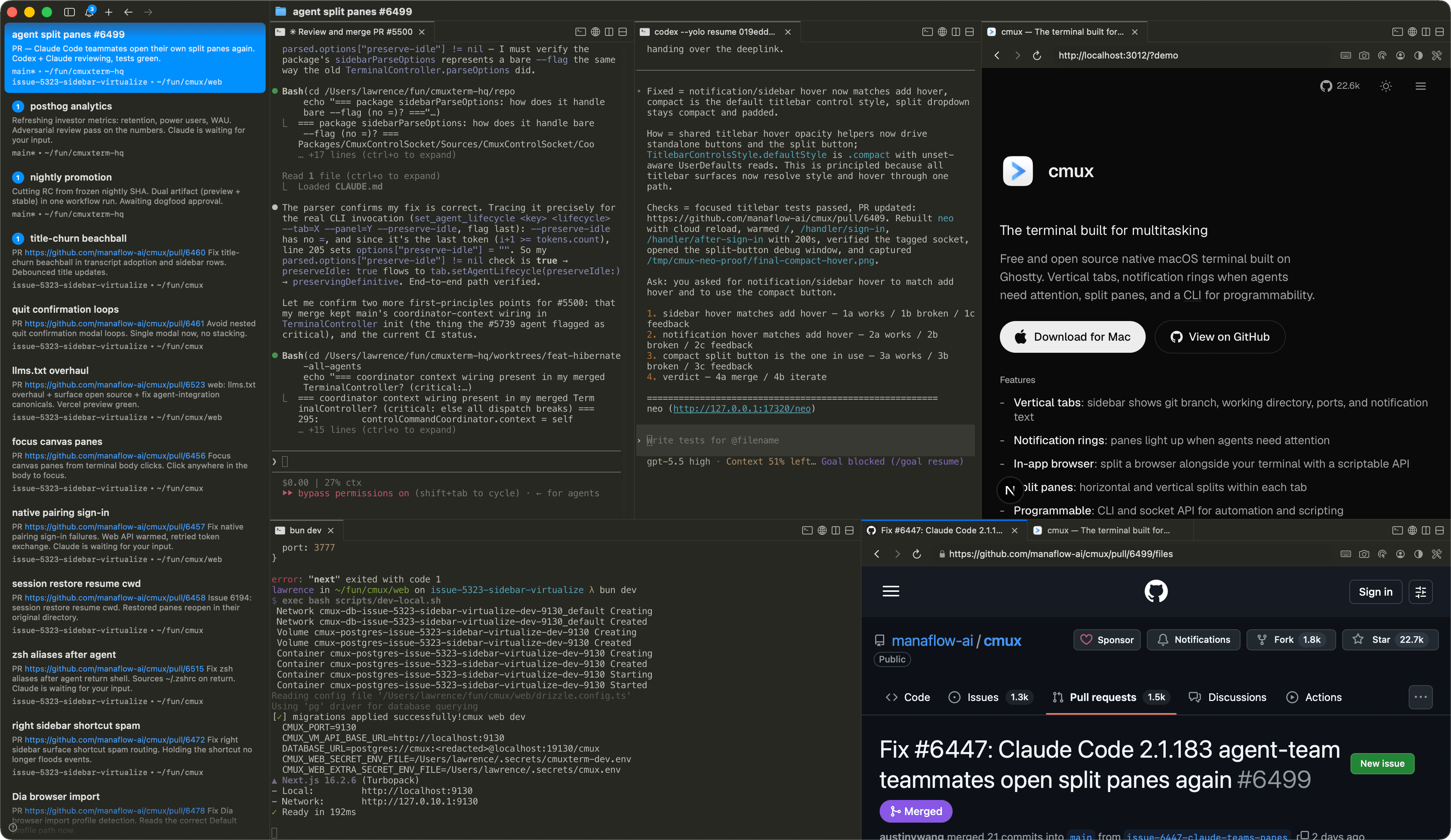
Безкоштовний нативний термінал для macOS з відкритим кодом на базі Ghostty. Вертикальні вкладки, кільця сповіщень коли агенти потребують уваги, розділені панелі та CLI для програмованості.
Можливості
- -Вертикальні вкладки: бічна панель показує гілку git, робочу директорію, порти та текст сповіщень
- -Кільця сповіщень: панелі підсвічуються, коли агенти потребують уваги
- -Вбудований браузер: розмістіть браузер поруч із терміналом зі скриптовим API
- -Розділені панелі: горизонтальний та вертикальний поділ у кожній вкладці
- -Програмований: CLI та socket API для автоматизації та скриптів
- -Прискорення GPU: на базі libghostty для плавного рендерингу
- -Легковісний: нативний Swift + AppKit, без Electron
- -Відкритий код: безкоштовний і під ліцензією GPL
- -Клавіатурні скорочення: розширені скорочення для робочих просторів, розділень, браузера та іншого
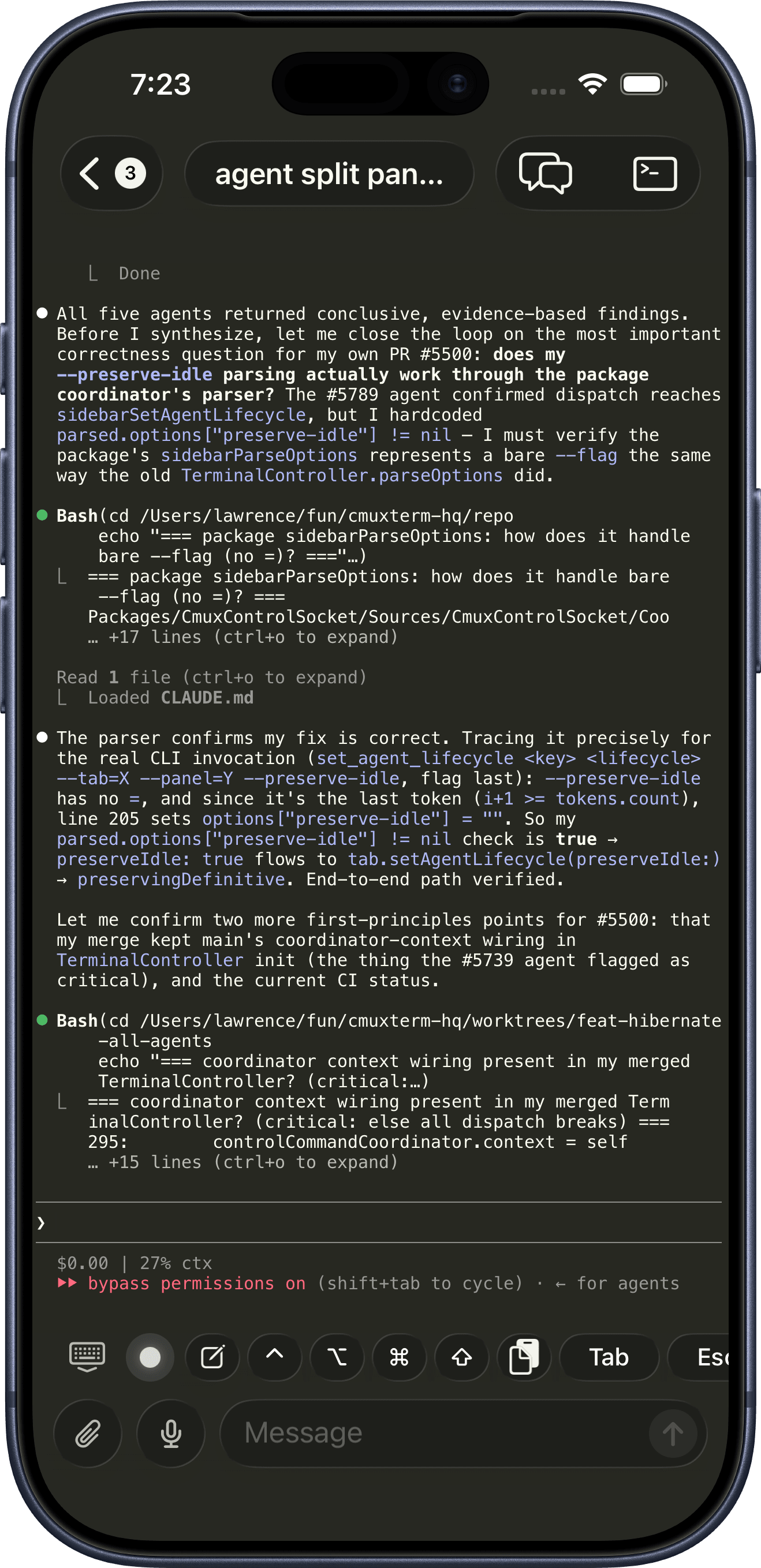
- -Супутник для iOS: твої термінали синхронізуються з iPhone та iPad у реальному часі
Питання та відповіді
Як cmux пов'язаний з Ghostty?
cmux — це не форк Ghostty. Він використовує libghostty як бібліотеку для рендерингу терміналу, так само як застосунки використовують WebKit для веб-в'юх. Ghostty — це окремий термінал; cmux — інший застосунок, побудований на його рушії рендерингу.
Які платформи підтримуються?
Доступні версії cmux перелічено в меню завантаження. для платформи, версію для якої ще не випущено.
Чи є застосунок для iOS?
Так, у беті. Сполучіть iPhone з Маком у вікні Mobile Connect і під'єднуйтеся до своїх терміналів з телефона, з опціональним пересиланням сповіщень термінала. Розповсюджується в TestFlight як cmux BETA. Ранній доступ входить до cmux Founders Edition.
З якими агентами програмування працює cmux?
З усіма. cmux — це термінал, тому будь-який агент, що працює в терміналі, підтримується одразу: Claude Code, Codex, OpenCode, Gemini CLI, Kiro, Aider, Goose, Amp, Cline, Cursor Agent та все інше, що можна запустити з командного рядка.
Чи може cmux оркеструвати кількох агентів і субагентів?
Так. Коли агент породжує субагентів або учасників команди, cmux перетворює їх на нативні панелі та розділення замість прихованих фонових процесів. Підтримується мультимодельна оркестрація Claude Code teams та oh-my-opencode, тож кожен агент у запуску видимий і керований.
Чи можу я використовувати cmux з віддаленими машинами?
Так. Відкривайте робочі простори через SSH і під'єднуйтеся до віддалених сеансів tmux, щоб агенти могли працювати на віддаленому хості, поки ви керуєте ними з cmux. Див. SSH і віддалений доступ.
Як працюють сповіщення?
Коли процесу потрібна увага, cmux показує кільця сповіщень навколо панелей, значки непрочитаного на бічній панелі, спливне вікно сповіщень і сповіщення на робочому столі macOS. Вони спрацьовують автоматично через стандартні escape-послідовності термінала (OSC 9/99/777), або ви можете викликати їх через cmux CLI і хуки агентів. Працює будь-який агент із підтримкою hooks або OSC, включно з Claude Code, Codex, OpenCode і pi.
Чи є cmux програмованим?
Так. Кожна дія доступна через cmux CLI і сокет Unix: створення робочих просторів, відкриття розділених панелей, надсилання введення, читання вмісту екрана, створення скриншотів і керування вбудованим браузером. Див. довідник CLI та документацію з автоматизації браузера.
Що вміє вбудований браузер?
cmux може розмістити панель зі справжнім браузером поруч із терміналом, і вона повністю програмована: навігація, знімки DOM, кліки, введення, виконання JavaScript та читання активності консолі й мережі через те саме socket API. Агенти використовують його, щоб перевіряти власні зміни у вебі, не залишаючи cmux. Див. автоматизацію браузера.
Чи має cmux скіли?
Так. Скіли це багаторазові робочі процеси, які можна дати будь-якому агенту, що працює в cmux, для таких речей, як керування CLI, автоматизація робочих просторів, налаштування та поверхні браузера. Перегляньте відкриту колекцію на cmux-skills або прочитайте документацію зі скілів.
Чи можна налаштувати клавіатурні скорочення?
Прив'язки клавіш терміналу зчитуються з конфігураційного файлу Ghostty (~/.config/ghostty/config). Скорочення cmux (робочі простори, розділення, браузер, сповіщення) можна налаштувати в Параметрах. Див. стандартні скорочення для повного списку.
Чи можу я налаштувати cmux?
Так. Рендеринг термінала використовує вашу конфігурацію Ghostty, тож теми, шрифти, кольори та курсор переносяться напряму. Власні налаштування cmux у ~/.config/cmux/cmux.json керують бічною панеллю, панеллю вкладок, розділеними панелями та поведінкою, і кожне сполучення клавіш можна редагувати. Див. конфігурацію.
Чи зберігаються мої сеанси?
Так. cmux відновлює ваші вікна, робочі простори, панелі, робочі каталоги та scrollback після перезапуску, і цей стан переживає повне перезавантаження комп'ютера, а не лише вихід із застосунку. Сеанси агентів на кшталт Claude Code, Codex і OpenCode теж повертаються. Див. відновлення сеансів.
Чим він відрізняється від tmux?
tmux це мультиплексор термінала, що працює всередині будь-якого термінала. cmux це нативний застосунок macOS з GUI: вертикальні вкладки, розділені панелі, вбудований браузер і socket API, усе вже вбудовано, без файлів конфігурації та клавіш-префіксів. При цьому багато хто залюбки використовує cmux разом із SSH і tmux, і cmux може нативно під'єднуватися до ваших віддалених сеансів tmux (бета).
cmux безкоштовний?
Так, cmux безкоштовний для використання. Вихідний код доступний на GitHub.
Як я можу підтримати cmux?
cmux безкоштовний і має відкритий вихідний код, і завжди таким буде. Якщо хочете підтримати розробку та отримати ранній доступ до того, що далі, включно з cmux AI, застосунком для iOS і Cloud VMs, перегляньте cmux Founders Edition.
У мене є запит на функцію або я знайшов баг
Ми хочемо про це почути. Відкрийте issue або pull request на GitHub чи напишіть нам.
Спільнота
- "Another day another libghostty-based project, this time a macOS terminal with vertical tabs, better organization/notifications, embedded/scriptable browser specifically targeted towards people who use a ton of terminal-based agentic workflows." — Another day another libghostty-based project, this time a macOS terminal with vertical tabs, better organization/notifications, embedded/scriptable browser specifically targeted towards people who use a ton of terminal-based agentic workflows. —
 Mitchell Hashimoto, Creator of Ghostty and founder of HashiCorp
 - "I'm late to the party, but cmux is great. Current split: Codex Mac app for knowledge work, learning, reading; cmux + Codex CLI for coding." — Я запізнився на вечірку, але cmux чудовий. Поточний поділ: застосунок Codex для Mac для роботи зі знаннями, навчання й читання; cmux + Codex CLI для кодування. —
 Peter Steinberger, Творець OpenClaw. Засновник PSPDFKit.
 - "This is exactly the product I've been looking for. After two hours this am I've in love." — This is exactly the product I've been looking for. After two hours this am I've in love. —
 Nick Schrock, Creator of Dagster. GraphQL co-creator.
 - "I've been using this all weekend and it's amazing." — I've been using this all weekend and it's amazing. —
 Edward Grefenstette, Director of Research at Google DeepMind
 - "> learn cmux
> trust me" — > вивчи cmux
> повір мені —
 David Ondrej
 - "this has been my favorite tool for past two weeks" — this has been my favorite tool for past two weeks —
 Max Forsey
 - "아직 늦지 않았어요. 저도 Ghostty 많이 쓰는데 이어서 cmux도 사랑입니다. 세로 탭, 알림 링, 내장 브라우저, 분할 패널, GPU 가속 등등.. 정말 이점이 많아요!" — Ще не пізно. Я багато користуюся Ghostty, але cmux теж люблю. Вертикальні вкладки, кільця сповіщень, вбудований браузер, розділені панелі, GPU-прискорення... переваг справді багато! —
 lucas
lucas - "cmux しばらく使ってみたが好きだな めちゃくちゃ良いというよりは、あーこれだわこれ、という感触 k1Low/moとの相性も良い" — Я користуюся cmux уже деякий час, і він мені подобається. Це не стільки 'неймовірно', скільки відчуття 'так, ось воно'. Він також добре працює з k1Low/mo. —
 yamadashy / やまだし
 - "我也主力用 cmux,还推荐给其他同事,原因就是通知系统,分工作区,快捷键好用,多工作并行时能提高效率,尽管 cmux 比较丑,但它的功能让我不得不用它。" — Я теж використовую cmux як основний термінал і рекомендую його колегам. Сповіщення, робочі простори й гарячі клавіші підвищують ефективність, коли паралельно виконується багато робіт. Хоч cmux трохи негарний, його функціональність робить його незамінним. —
 minixalpha
 - "Tuve algún tema con el navegador pero cmux es insustituible en mi día a día." — У мене була проблема з браузером, але cmux незамінний у моїй щоденній роботі. —
 Juan Barbat
 - "اقتراحي هو استعملوا Cmux وخلاص... فك لي ازمة بكل شيء تقريبًا من ناحية التيرمنل" — Моя порада проста: користуйтеся cmux. Він вирішив майже всі мої проблеми з терміналом. —
 Yousef Rol
 - "Hab mir gerade cmux installiert, hab bisher ghostty genutzt. Aber cmux ist nochmal besser für KI Agenten und Coding geeignet." — Я щойно встановив cmux. Раніше користувався Ghostty, але cmux ще краще підходить для AI-агентів і програмування. —
 Tobias Glöckler
 - "po nao sei como vivi tanto tempo sem cmux" — Не знаю, як я так довго жив без cmux. —
 Wesley
 - "요즘 최애 터미널 cmux. 개인적으로 멀티 터미널 돌리기 너무 좋은거 같아" — cmux останнім часом мій улюблений термінал. Особисто я думаю, що він дуже добре підходить для запуску кількох терміналів. —
 ub:)ub 🎗️
 - "cmux 良さそうすぎてついにバイバイ VSCode するときなのかもしれない" — cmux looks so good it might finally be time to say goodbye to VSCode —
 あさざ
あさざ - "eğer birden fazla terminal ile çalışmanız gerekiyorsa kesinlikle cmux'u denemelisiniz. terminal sizden bir cevap beklediğinde otomatik bildirim geliyor." — Якщо вам потрібно працювати з кількома терміналами, обов'язково спробуйте cmux. Коли термінал чекає на ваш ввід, він автоматично надсилає сповіщення. —
 Şerafettin Sarışen
 - "最近用的最多的终端工具就是这个 cmux,开源免费。基本上代替 iTerm2 了。完美解决了多终端窗口排列问题。" — cmux — це термінальний інструмент, яким я останнім часом користуюся найбільше. Він open source і безкоштовний. Для мене він майже замінив iTerm2 і чудово вирішує проблему розміщення багатьох термінальних вікон. —
 金尘马
金尘马 - "Я уже какое-то время назад на него переехал с warp и как будто пересел на ракету. Он написан нативно для Mac OS на Swift и его супер активно развивают." — Я вже деякий час як перейшов на нього з Warp, і це було наче пересісти на ракету. Він нативний для macOS, написаний на Swift і дуже активно розвивається. —
 Закиев Василь
 - "推荐一个最近喜欢用的工具: cmux,不用频繁切换终端窗口了" — Інструмент, який мені нещодавно сподобалося використовувати: cmux. Більше не треба постійно перемикатися між вікнами термінала. —
 Mazzystar
 - "Hey, this looks seriously awesome. Love the ideas here, specifically: the programmability, layered UI, browser w/ api. Looking forward to giving this a spin. Also want to add that I really appreciate Mitchell Hashimoto creating libghostty; it feels like an exciting time to be a terminal user." — Hey, this looks seriously awesome. Love the ideas here, specifically: the programmability, layered UI, browser w/ api. Looking forward to giving this a spin. Also want to add that I really appreciate Mitchell Hashimoto creating libghostty; it feels like an exciting time to be a terminal user. —johnthedebs
- "Vertical tabs in my terminal 🤤 I never thought of that before. I use and love Firefox vertical tabs." — Vertical tabs in my terminal! I never thought of that before. I use and love Firefox vertical tabs. —
 Joe Riddle
 - "Gave this a run and it was pretty intuitive. Good work!" — Gave this a run and it was pretty intuitive. Good work! —dchu17
- "I like it, ran it in the past day on three parallel projects each with several worktrees. Having this paired with lazygit and yazi / nvim made me a bit more productive than usual without having to chase multiple ghostty / iTerm instances. Also feels more natural than tmux." — I like it, ran it in the past day on three parallel projects each with several worktrees. Having this paired with lazygit and yazi / nvim made me a bit more productive than usual without having to chase multiple ghostty / iTerm instances. Also feels more natural than tmux. —afruth
- "cmux良さそうなので入れてみたけれど、良い" — Tried cmux since it looked good — it's good —
 Norihiro Narayama
 - "cmux is pretty good." — cmux is pretty good. —
 Kishore Neelamegam
 - "cmux.dev に乗り換えた" — Switched to cmux.dev —
 かたりん
かたりん - "This has been such a useful find. I can't recommend it enough." — This has been such a useful find. I can't recommend it enough. —
 Scott Watermasysk
 - "grabbed this over the weekend and loved it. been waiting for something like this." — grabbed this over the weekend and loved it. been waiting for something like this. —
 John Blythe
 - "This is exactly what I've wanted. Amazing job thank you!" — This is exactly what I've wanted. Amazing job thank you! —
 Christopher
 - "Been using this for a week and it's fantastic. Vert tab for each WIP task. Inside, claudes on one side and browser with PR and resources on the other, switch between tasks and stay organized. Mix that with skills to have Claude watch CI recursively, etc. feeling enlightened tbh" — Been using this for a week and it's fantastic. Vert tab for each WIP task. Inside, claudes on one side and browser with PR and resources on the other, switch between tasks and stay organized. Mix that with skills to have Claude watch CI recursively, etc. feeling enlightened tbh —
 Connor
 - "年初にWarpからGhosttyに乗り換えたけど、今はcmuxに乗り換えた💻 垂直タブが便利で、Claude Codeのタスクの終了が通知されるのがありがたい。Ghosttyベースだから爆速動作はそのまま。ghosttyでやったブランチ表示や補完もそのまま使える" — I switched from Warp to Ghostty at the start of the year, but now I've switched to cmux. The vertical tabs are convenient, and I appreciate getting notified when Claude Code tasks finish. It's Ghostty-based so the blazing fast performance carries over. Branch display and completions I set up in Ghostty still work too. —
 鹿野 壮 Takeshi Kano
Готуються нові версії cmux.