
cmux
The terminal built for multitasking, organization, and programmability.
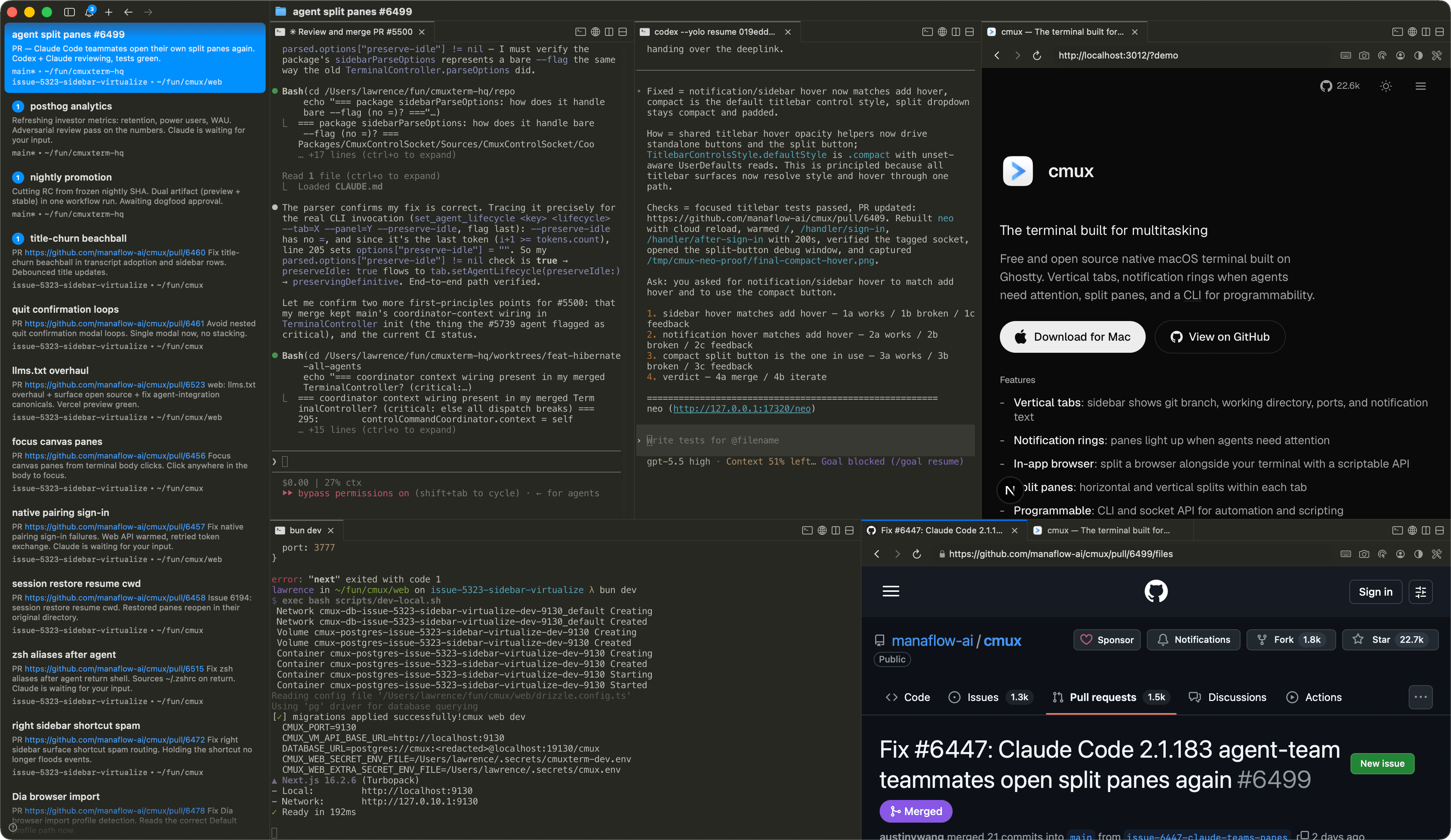
基于 Ghostty 构建的免费开源原生 macOS 终端。支持垂直标签页、agent 需要关注时的通知环、分割面板,以及用于可编程性的 CLI。
功能特性
常见问题
cmux 和 Ghostty 是什么关系?
cmux 不是 Ghostty 的 fork。它使用 libghostty 作为终端渲染库,就像应用使用 WebKit 来渲染网页一样。Ghostty 是一个独立的终端;cmux 是基于其渲染引擎构建的不同应用。
支持哪些平台?
可在下载菜单中查看已推出的 cmux 版本。尚未发布的平台可以。
有 iOS 应用吗?
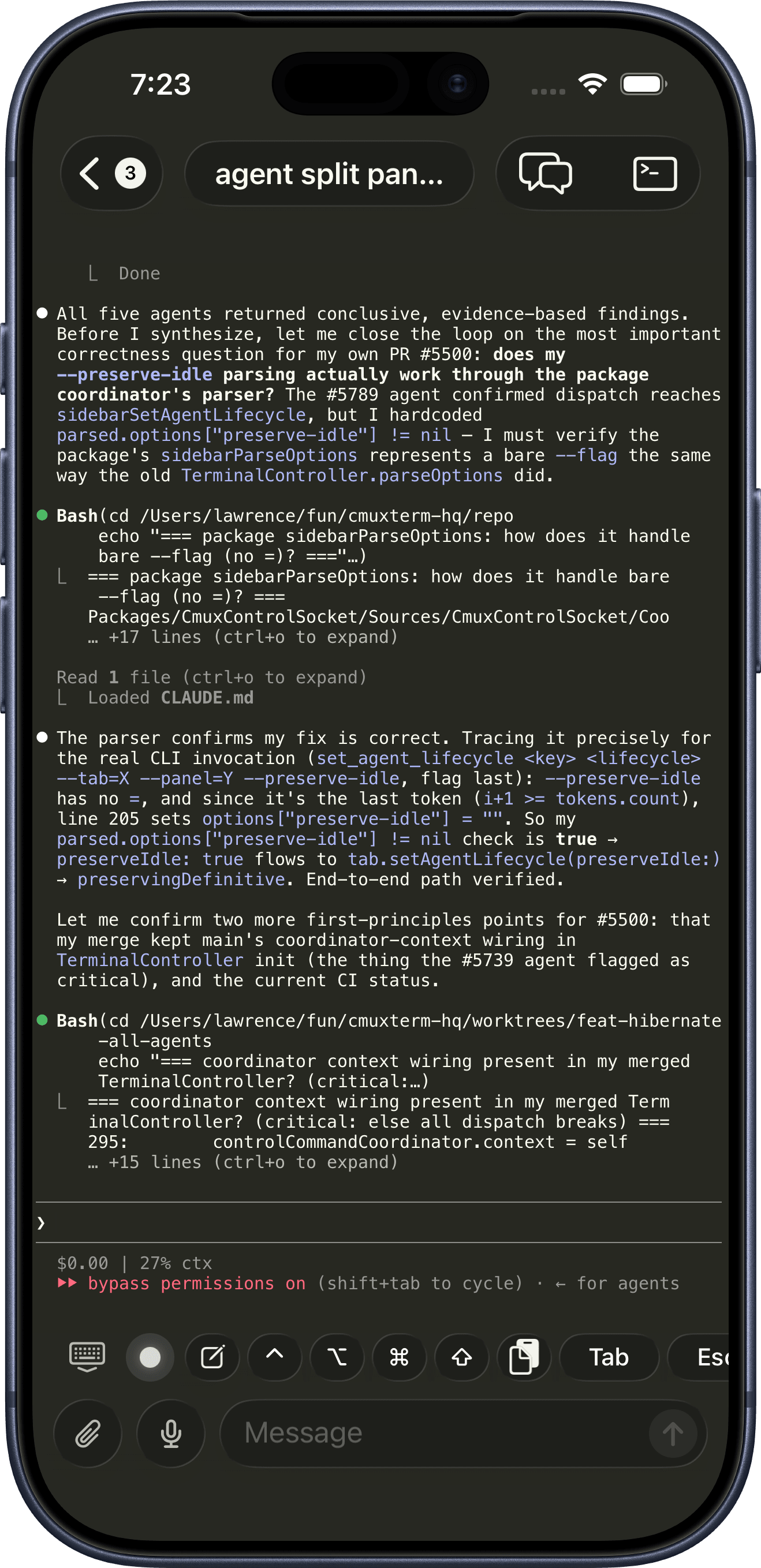
有,目前是 beta 版。在 Mobile Connect 窗口中将你的 iPhone 与 Mac 配对,即可从手机连接到你的终端,并可选择转发终端通知。它通过 TestFlight 以 cmux BETA 的形式发布。cmux Founders Edition 包含抢先访问权限。
cmux 支持哪些 coding agent?
全部都支持。cmux 是一个终端,所以任何在终端中运行的 agent 都可以直接使用:Claude Code、Codex、OpenCode、Gemini CLI、Kiro、Aider、Goose、Amp、Cline、Cursor Agent,以及任何可以从命令行启动的工具。
cmux 可以编排多个 agent 和 subagent 吗?
是的。当一个 agent 派生出 subagent 或协作者时,cmux 会把它们变成原生面板和分屏,而不是隐藏的后台进程。它支持 Claude Code teams 和 oh-my-opencode 多模型编排,让一次运行中的每个 agent 都可见、可控。
可以将 cmux 用于远程机器吗?
是的。通过 SSH 打开工作区并连接到远程 tmux 会话,这样 agent 就可以在远程主机上运行,同时你从 cmux 来驱动它们。参阅 SSH 与远程。
通知是如何工作的?
当进程需要关注时,cmux 会在面板周围显示通知环、在侧边栏显示未读标记、弹出通知面板,以及发送 macOS 桌面通知。这些通过标准终端转义序列(OSC 9/99/777)自动触发,你也可以通过 cmux CLI 和 agent hooks 手动触发。任何支持 hooks 或 OSC 的 agent 都可以使用,包括 Claude Code、Codex、OpenCode 和 pi。
cmux 可编程吗?
是的。每个操作都可以通过 cmux CLI 和一个 Unix socket 进行:创建工作区、打开分割面板、发送输入、读取屏幕内容、截图,以及驱动内置浏览器。参阅 CLI 参考和浏览器自动化文档。
内置浏览器能做什么?
cmux 可以在终端旁边分屏打开一个真正的浏览器面板,并且完全可编程:导航、对 DOM 截照、点击、输入、执行 JavaScript,以及通过同一个 socket API 读取控制台和网络活动。agent 用它来验证自己的 web 改动,无需离开 cmux。参阅浏览器自动化。
cmux 有 skills 吗?
有。skills 是可复用的工作流,你可以把它交给任何在 cmux 中运行的 agent,用于 CLI 控制、工作区自动化、设置和浏览器界面等场景。在 cmux-skills 浏览开放的集合,或阅读 skills 文档。
可以自定义快捷键吗?
终端键位绑定从你的 Ghostty 配置文件(~/.config/ghostty/config)中读取。cmux 特有的快捷键(工作区、分屏、浏览器、通知)可以在设置中自定义。完整列表请参阅默认快捷键。
可以自定义 cmux 吗?
是的。终端渲染使用你的 Ghostty 配置,因此主题、字体、颜色和光标会直接沿用。cmux 自身的设置位于 ~/.config/cmux/cmux.json,用于控制侧边栏、标签栏、分割面板和行为,每个键盘快捷键都可编辑。参阅配置。
我的会话会被保存吗?
是的。重新启动时,cmux 会恢复你的窗口、工作区、面板、工作目录和回滚内容,而且这些状态在整机重启后也能保留,不仅仅是退出应用。Claude Code、Codex 和 OpenCode 等 agent 会话也会一并恢复。参阅会话恢复。
和 tmux 相比如何?
tmux 是在任何终端内运行的终端复用器。cmux 是一个带 GUI 的原生 macOS 应用:垂直标签页、分割面板、内置浏览器和 socket API 全部内置,无需配置文件或前缀键。话虽如此,很多人也乐于把 cmux 与 SSH 和 tmux 搭配使用,而且 cmux 可以原生连接到你的远程 tmux 会话(beta)。
cmux 免费吗?
是的,cmux 免费使用。源代码在 GitHub 上公开。
我该如何支持 cmux?
cmux 免费且开源,并且永远都会如此。如果你想支持开发并抢先体验后续内容,包括 cmux AI、iOS 应用和 Cloud VMs,请了解 cmux Founders Edition。
我有功能请求或发现了一个 bug
我们很想听到你的反馈。在 GitHub 上提交一个 issue 或 pull request,或者 给我们发邮件。
社区
- "Another day another libghostty-based project, this time a macOS terminal with vertical tabs, better organization/notifications, embedded/scriptable browser specifically targeted towards people who use a ton of terminal-based agentic workflows." — 又一个基于 libghostty 的项目,这次是一个带垂直标签页、更好的组织/通知、内置可编程浏览器的 macOS 终端,专门面向大量使用终端 agent 工作流的用户。 —
 Mitchell Hashimoto, Creator of Ghostty and founder of HashiCorp
 - "I'm late to the party, but cmux is great. Current split: Codex Mac app for knowledge work, learning, reading; cmux + Codex CLI for coding." — 来晚了,但 cmux 很棒。当前分工:Codex Mac 应用用于知识工作、学习和阅读;cmux + Codex CLI 用于编码。 —
 Peter Steinberger, OpenClaw 创建者。PSPDFKit 创始人。
 - "This is exactly the product I've been looking for. After two hours this am I've in love." — 这正是我一直在找的产品。用了两小时就爱上了。 —
 Nick Schrock, Creator of Dagster. GraphQL co-creator.
 - "I've been using this all weekend and it's amazing." — 整个周末都在用,太棒了。 —
 Edward Grefenstette, Director of Research at Google DeepMind
 - "> learn cmux
> trust me" — > 学 cmux
> 相信我 —
 David Ondrej
 - "this has been my favorite tool for past two weeks" — 过去两周最喜欢的工具 —
 Max Forsey
 - "아직 늦지 않았어요. 저도 Ghostty 많이 쓰는데 이어서 cmux도 사랑입니다. 세로 탭, 알림 링, 내장 브라우저, 분할 패널, GPU 가속 등등.. 정말 이점이 많아요!" — 还不算晚。我也经常用 Ghostty,但接着用 cmux 也很爱。垂直标签、通知环、内置浏览器、分屏面板、GPU 加速等等,优点真的很多! —
 lucas
lucas - "cmux しばらく使ってみたが好きだな めちゃくちゃ良いというよりは、あーこれだわこれ、という感触 k1Low/moとの相性も良い" — 我试用了 cmux 一段时间,挺喜欢的。与其说是“特别惊艳”,不如说是“啊,就是这个”的感觉。它和 k1Low/mo 也很搭。 —
 yamadashy / やまだし
 - "我也主力用 cmux,还推荐给其他同事,原因就是通知系统,分工作区,快捷键好用,多工作并行时能提高效率,尽管 cmux 比较丑,但它的功能让我不得不用它。" —
 minixalpha
 - "Tuve algún tema con el navegador pero cmux es insustituible en mi día a día." — 浏览器方面我遇到过一点问题,但 cmux 已经是我日常工作里不可或缺的工具。 —
 Juan Barbat
 - "اقتراحي هو استعملوا Cmux وخلاص... فك لي ازمة بكل شيء تقريبًا من ناحية التيرمنل" — 我的建议就是直接用 cmux。它几乎解决了我在终端方面的所有问题。 —
 Yousef Rol
 - "Hab mir gerade cmux installiert, hab bisher ghostty genutzt. Aber cmux ist nochmal besser für KI Agenten und Coding geeignet." — 我刚装了 cmux。之前一直用 Ghostty,但 cmux 更适合 AI agent 和写代码。 —
 Tobias Glöckler
 - "po nao sei como vivi tanto tempo sem cmux" — 说真的,我不知道没有 cmux 的这些年我是怎么过来的。 —
 Wesley
 - "요즘 최애 터미널 cmux. 개인적으로 멀티 터미널 돌리기 너무 좋은거 같아" — 最近最喜欢的终端是 cmux。个人觉得它很适合同时跑多个终端。 —
 ub:)ub 🎗️
 - "cmux 良さそうすぎてついにバイバイ VSCode するときなのかもしれない" — cmux 看起来太棒了,也许终于到了告别 VSCode 的时候 —
 あさざ
あさざ - "eğer birden fazla terminal ile çalışmanız gerekiyorsa kesinlikle cmux'u denemelisiniz. terminal sizden bir cevap beklediğinde otomatik bildirim geliyor." — 如果你需要同时处理多个终端,真的应该试试 cmux。当终端等待你输入时,它会自动发通知。 —
 Şerafettin Sarışen
 - "最近用的最多的终端工具就是这个 cmux,开源免费。基本上代替 iTerm2 了。完美解决了多终端窗口排列问题。" —
 金尘马
金尘马 - "Я уже какое-то время назад на него переехал с warp и как будто пересел на ракету. Он написан нативно для Mac OS на Swift и его супер активно развивают." — 我前段时间从 Warp 换到了它,感觉就像坐上了火箭。它是 macOS 原生 Swift 写的,而且开发非常活跃。 —
 Закиев Василь
 - "推荐一个最近喜欢用的工具: cmux,不用频繁切换终端窗口了" —
 Mazzystar
 - "Hey, this looks seriously awesome. Love the ideas here, specifically: the programmability, layered UI, browser w/ api. Looking forward to giving this a spin. Also want to add that I really appreciate Mitchell Hashimoto creating libghostty; it feels like an exciting time to be a terminal user." — 看起来真的很厉害。喜欢这些想法:可编程性、分层 UI、带 API 的浏览器。期待试用。也想说非常感谢 Mitchell Hashimoto 创建了 libghostty,作为终端用户感觉现在是个令人兴奋的时代。 —johnthedebs
- "Vertical tabs in my terminal 🤤 I never thought of that before. I use and love Firefox vertical tabs." — 终端里的垂直标签页!之前从没想过。我用 Firefox 垂直标签页用得很开心。 —
 Joe Riddle
 - "Gave this a run and it was pretty intuitive. Good work!" — 试了一下,很直观。做得好! —dchu17
- "I like it, ran it in the past day on three parallel projects each with several worktrees. Having this paired with lazygit and yazi / nvim made me a bit more productive than usual without having to chase multiple ghostty / iTerm instances. Also feels more natural than tmux." — 很喜欢,过去一天在三个并行项目上用了,每个都有多个 worktree。配合 lazygit 和 yazi/nvim,比以前高效多了,不用在多个 Ghostty/iTerm 实例之间切换。比 tmux 也更自然。 —afruth
- "cmux良さそうなので入れてみたけれど、良い" — 试了 cmux,确实不错 —
 Norihiro Narayama
 - "cmux is pretty good." — cmux 挺好用的。 —
 Kishore Neelamegam
 - "cmux.dev に乗り換えた" — 换到 cmux.dev 了 —
 かたりん
かたりん - "This has been such a useful find. I can't recommend it enough." — 非常有用的发现。强烈推荐。 —
 Scott Watermasysk
 - "grabbed this over the weekend and loved it. been waiting for something like this." — 周末用了,很喜欢。一直在等这样的工具。 —
 John Blythe
 - "This is exactly what I've wanted. Amazing job thank you!" — 这正是我想要的。做得太好了,谢谢! —
 Christopher
 - "Been using this for a week and it's fantastic. Vert tab for each WIP task. Inside, claudes on one side and browser with PR and resources on the other, switch between tasks and stay organized. Mix that with skills to have Claude watch CI recursively, etc. feeling enlightened tbh" — 用了一周,非常棒。每个进行中的任务一个垂直标签页。里面一边是 Claude,另一边是浏览器看 PR 和资料,在任务之间切换保持有序。配合 skill 让 Claude 递归监控 CI 等等。感觉开悟了。 —
 Connor
 - "年初にWarpからGhosttyに乗り換えたけど、今はcmuxに乗り換えた💻 垂直タブが便利で、Claude Codeのタスクの終了が通知されるのがありがたい。Ghosttyベースだから爆速動作はそのまま。ghosttyでやったブランチ表示や補完もそのまま使える" — 年初从 Warp 换到 Ghostty,现在又换到了 cmux。垂直标签页很方便,Claude Code 任务完成时收到通知很实用。基于 Ghostty 所以依然飞快。之前在 Ghostty 里设置的分支显示和补全也都能用。 —
 鹿野 壮 Takeshi Kano
更多 cmux 版本即将推出。