
Folio Type
Bookish type for cmux: a warm grotesque for the chrome, a text serif for agent replies and Markdown, a clear mono for code.
teamleaderleo· 0 downloads · 0 stars· v1.0.0
Bookish type for cmux: a warm grotesque for the chrome, a text serif for agent replies and Markdown, a clear mono for code. Three OFL fonts, inlined; colors stay yours.
Folio Type

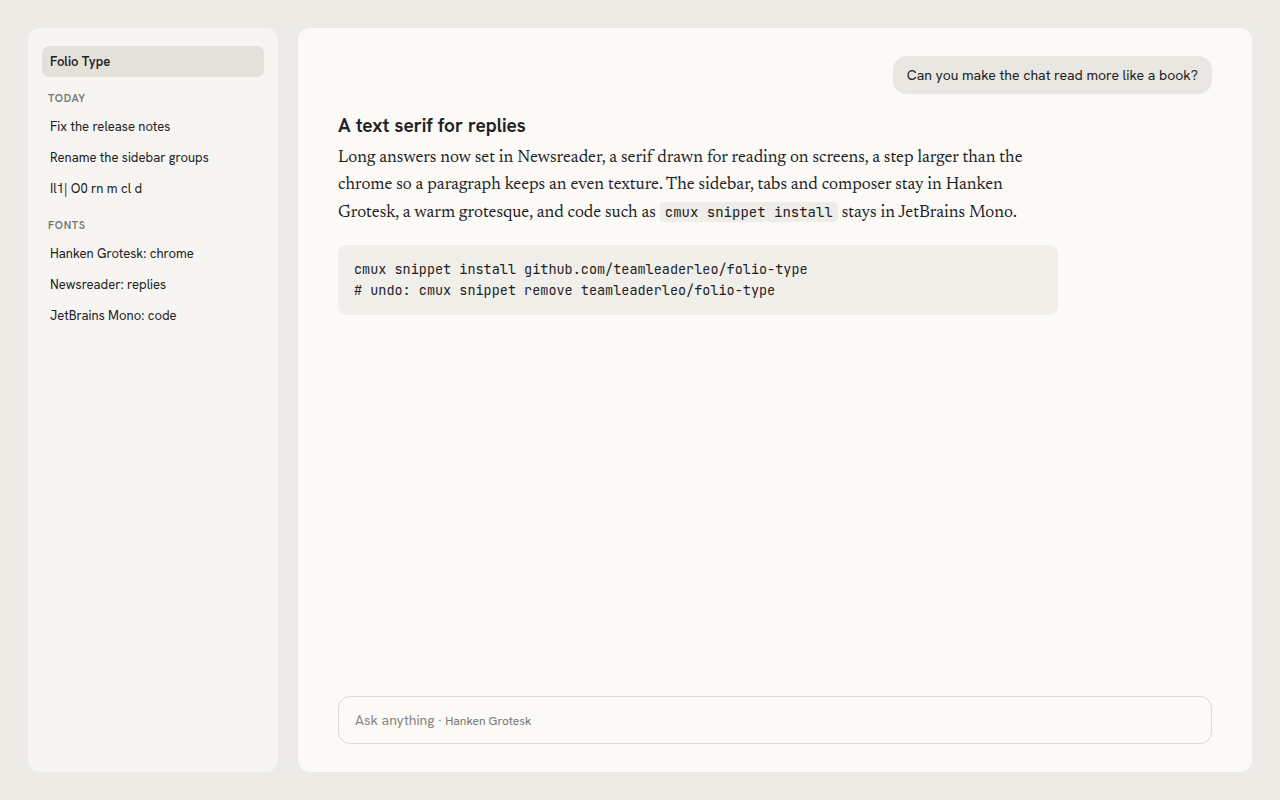
Bookish type for cmux. A warm grotesque for the chrome, a text serif for agent replies and Markdown, a clear mono for code. Colors stay yours: it changes only the fonts, so it sits on top of any theme (Teal Twin included). No code runs, and nothing needs installing on your Mac: the three fonts are inlined in the stylesheets.
| Where | Font | Why |
|---|---|---|
| Sidebar, tabs, composer, cards, Markdown headings | Hanken Grotesk | An open, warm grotesque with a little character in its round letters; clear at 11 to 13 px |
| Agent replies (15 px, a step larger) and Markdown text | Newsreader | A text serif drawn for long reading on screens, with sturdy serifs and an even texture |
| Code, in the chat and in Markdown | JetBrains Mono | Distinct `Il1 |
It is in the spirit of editorial brand type that sets a slightly quirky grotesque beside a sturdy book serif, made only from fonts under the SIL Open Font License.
Install
cmux snippet install github.com/teamleaderleo/folio-typeOr open it in the App Store on cmux.com. cmux shows one line (what it is, where it comes from, that no code runs) and asks first. It applies at once.
cmux snippet remove teamleaderleo/folio-type puts back the look you had (your own
agent-pane/theme.css and markdown/theme.css too, if you had them).
What it changes
agent-pane/theme.css: the agent chat's chrome font (--font-ui), its reply font and size (--cv-font, 15 px on 24 px lines) and its code font (--cv-mono).markdown/theme.css: the Markdown viewer's text, heading and code fonts (--cmux-md-font-family,--cmux-md-heading-font-family,--cmux-md-code-font-family).
The terminal keeps its own font. To use JetBrains Mono there too, install fonts/jetbrains-mono.woff2
(or JetBrains Mono from its project) and run cmux settings set terminal.fontFamily "JetBrains Mono".
Fonts and licenses
Every font here is under the SIL Open Font License 1.1, which allows bundling and redistributing it with its notice. None of the three declares a Reserved Font Name.
| Font | Copyright | License | File |
|---|---|---|---|
| Hanken Grotesk | 2021 The Hanken Grotesk Project Authors (marcologous/hanken-grotesk) | OFL 1.1 | fonts/hanken-grotesk.woff2 |
| Newsreader | 2020 The Newsreader Project Authors (productiontype/Newsreader) | OFL 1.1 | fonts/newsreader.woff2 |
| JetBrains Mono | 2020 The JetBrains Mono Project Authors (JetBrains/JetBrainsMono) | OFL 1.1 | fonts/jetbrains-mono.woff2 |
The files are the Latin variable-weight subsets Fontsource publishes
(@fontsource-variable/<name> 5.2.10, files/<name>-latin-wght-normal.woff2), byte for byte; the
stylesheets inline the same bytes as base64 data: URLs. fonts/OFL.txt has each notice and the
license text. The stylesheets, this README and tools/ are MIT (LICENSE).
Make your own
- Put
agent-pane/theme.cssand/ormarkdown/theme.cssin a repo, with acmux-snippet.jsonat the root like this one (idstarts with your GitHub name). Fonts go in asdata:URLs: a snippet loads nothing from the network. cmux theme check .reports anything cmux would not load.- Tag a release with the version (
1.0.0) and add the topicscmux-extensionandcmux-snippet(repo page, the gear beside About, Topics). - Open a PR adding it to
snippets.jsonin manaflow-ai/cmux-extensions to list it on cmux.com.
tools/render.sh redraws screenshots/preview.png from tools/preview.html with headless Chrome.